Distance zones
View which region price is used to calculate the shipping cost of a package leaving a packing point based on the distance to the delivery city.
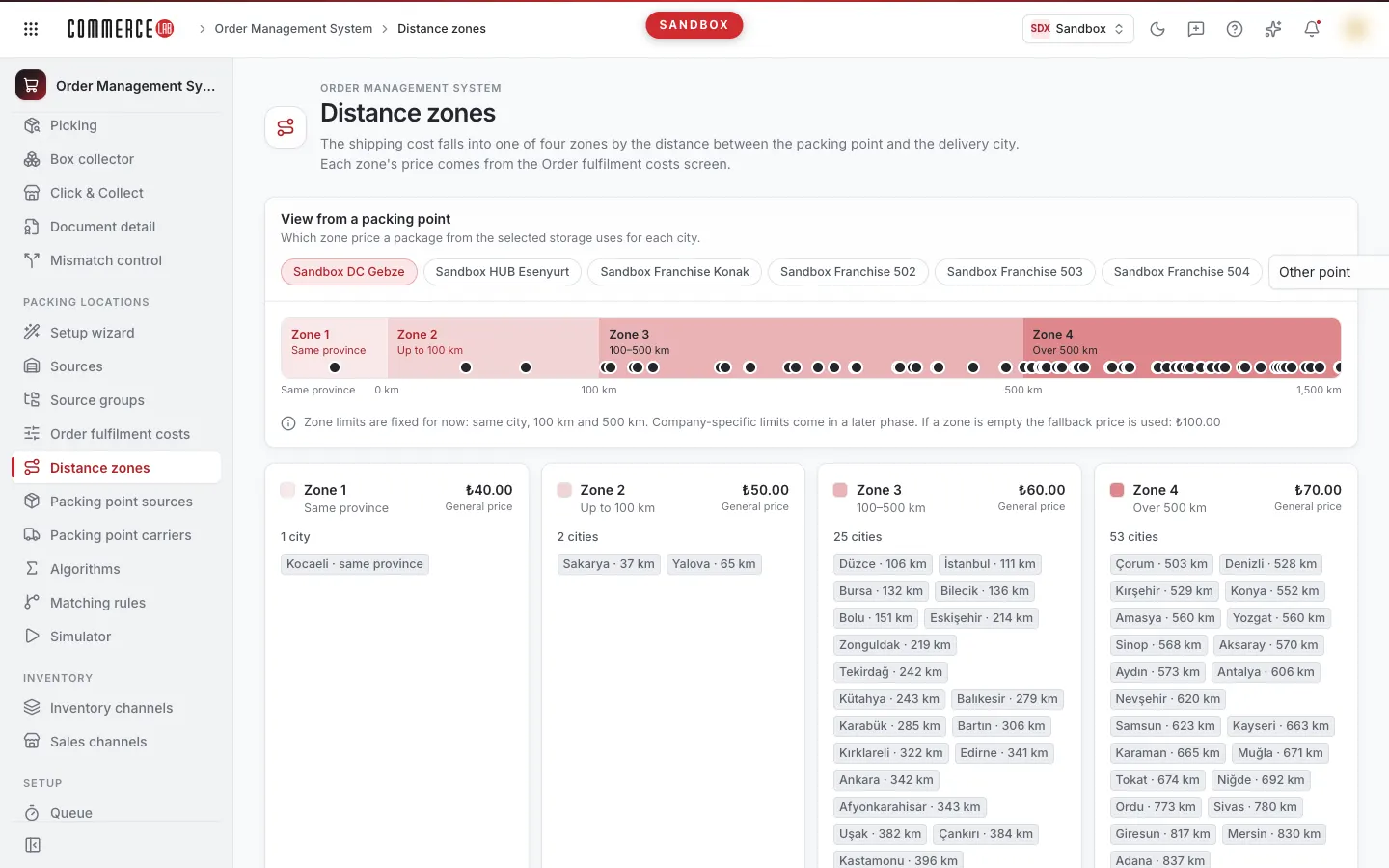
Distance zones (OMS › Packing locations › Distance zones) show which region price is used to calculate the shipping cost of a package. The region is determined based on the distance between the packing point's city and the delivery city.
The screen is read-only; nothing can be changed here. Region prices come from the Order fulfilment costs screen's Shipping cost tab; use that tab to change prices.
Regions
| Region | When |
|---|---|
| Region 1 | Packing warehouse and delivery city are the same |
| Region 2 | Up to 100 km |
| Region 3 | 100–500 km |
| Region 4 | Over 500 km or no distance record |
| Fallback | Used if region value is empty |
Region boundaries (same city, 100 km, 500 km) are currently fixed; company-specific boundaries will come in a later phase.
How to use
- Select a packing point in the View from a packing point card. Packing points (distribution centers and HUBs first, up to six) are highlighted as buttons; others are in the Other point list. Warehouses that do not pack are marked as "(does not pack)" in this list.
- The card's ribbon shows the four regions and the distance of each city to the selected warehouse as dots. Below the ribbon is the Fallback price ("Fallback price used if region value is empty").
- Region cards show the price for each region, where the price comes from (General price, a group, source, or warehouse value), and the cities belonging to that region. If the region value is empty, the card shows Fallback used and displays the Fallback price.
- The Distance table lists each city's distance and region relative to the selected warehouse (From, To, Distance, Region). You can search cities with Search cities and sort by clicking column headers. The warehouse's own city is not listed in the table; it appears as "Same city" in the Region 1 card.
Notes
- Displayed prices are for delivery to address and apply to all shipments. Prices entered specifically for a shipment are not shown here; see them in Order fulfilment costs › Shipping cost tab.
- If the region is set to 0, the price is calculated as 0; Fallback is only used when the region is left empty.
- If the warehouse city is not defined, a warning appears and all cities are considered Region 4.
- Cities without a distance record are calculated with the Region 4 price; these cities are listed in a warning and marked as "No distance". Distances recorded as 0 km are also treated as "No record" (0 km · treated as no record).
- The city distance table is shared across all companies; editing is only available to the CommerceLab team.
- If source groups cannot be read, group values are not considered; prices are shown from General, source, or warehouse values and a warning appears. If the value profile cannot be read, prices show as "—" with the reason displayed.
- The screen is visible to users with OMS location read permission. OwnerAdmin and TenantAdmin see all packing points; other users do not see distribution centers, HUBs, or vendor points in the list.